PLANETARY INTERACTION HELP INDEX
1-The interactive planetary maps
2- Zooming and Navigating the planet
The interactive planetary maps
The planet map page is the basic interactive interface to explore planets.
The maps are taken from NASA and other public atronomical services and are deatiled as much as possible. In the future we plan to use even better and more detailed maps.
Let's see the main elements of this page:
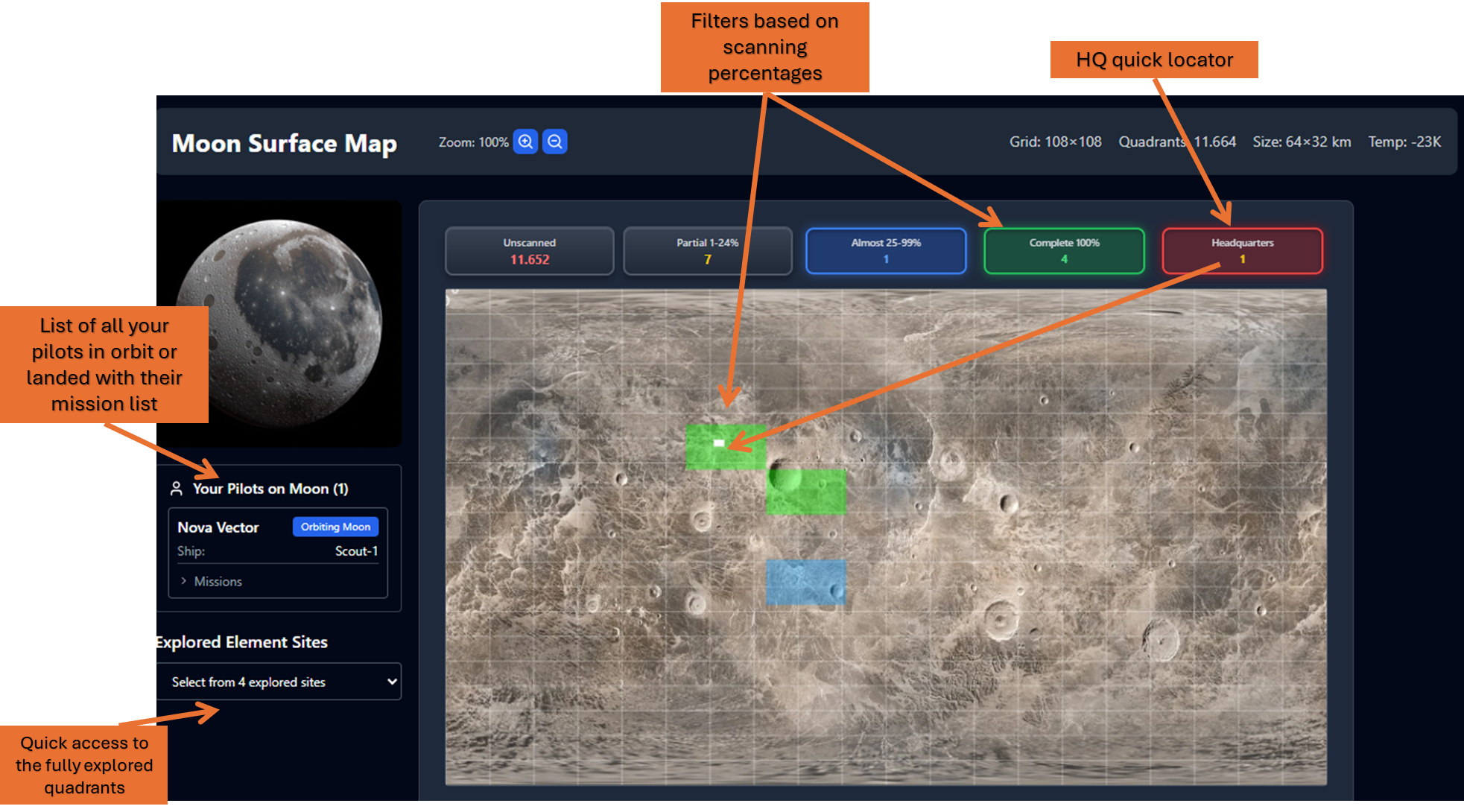
- Left panel: let's start from the left section. There you will have the list of all your pilots, along with their ships, that are currently orbiting or that are landed on the planet. Each Pilot can do different things at the same time. For example you can bring 2-3 ships in orbit and start scanning one ore more quandrants or mining etc...
Below the pilots list you have a quick drop-down list with all the quadrants fully scanned you can quickly select and open the one with the desidered resrouce type (look the mining help for more info)
- On top of the map there are the filtering buttons: you can use them in combination with the map zoom (using the mouse wheel or the zoom buttons) to navigate the map and find a previse quadrant on it.
- Planets with HeadQuarters have also and HQ red button that immediatly shows you the HQ location that you can double click to enter. HQ quadrants are always already 100% scanned so you can immediatly land on them.
Zooming and Navigating the planet
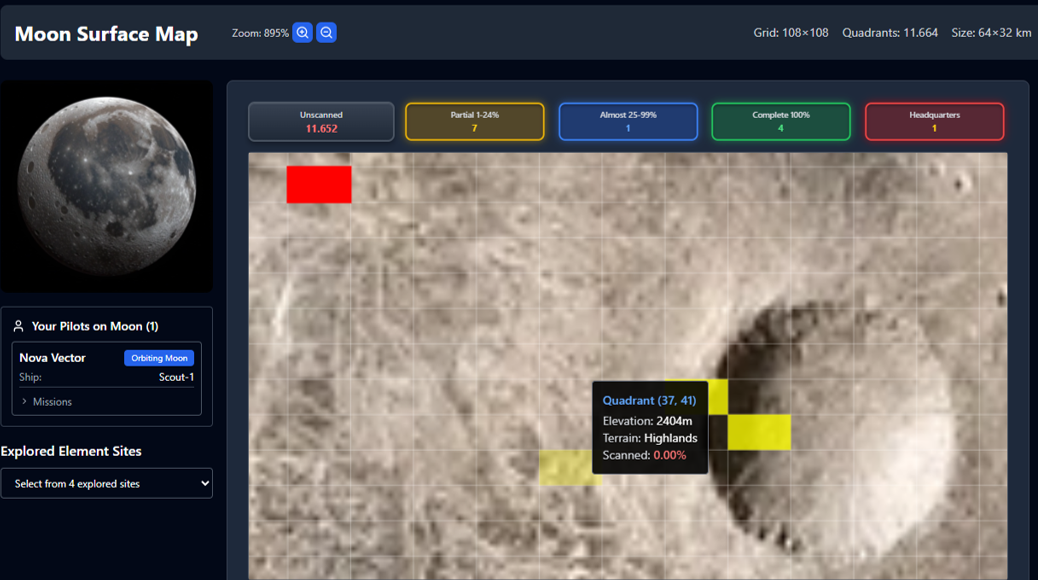
Look this example: you can zoom and move around. Usually after 300% zoom you can see the planet individual quadrants: a "Quadrant" is the minimum individual terrain unit on a planet. Each planet has a different number of quandrant and also their sizes changes. For eample the Earth's moon has 108x108 quadrants each large 64x32 km. The quadrant size will determine how many resources can be found and how long it will take to be fully scanned. Hover with the mouse on a quadrant to get some short overview.
- Double click on any quadrant to the the "Quadrant Details" page
Quadrants Operations
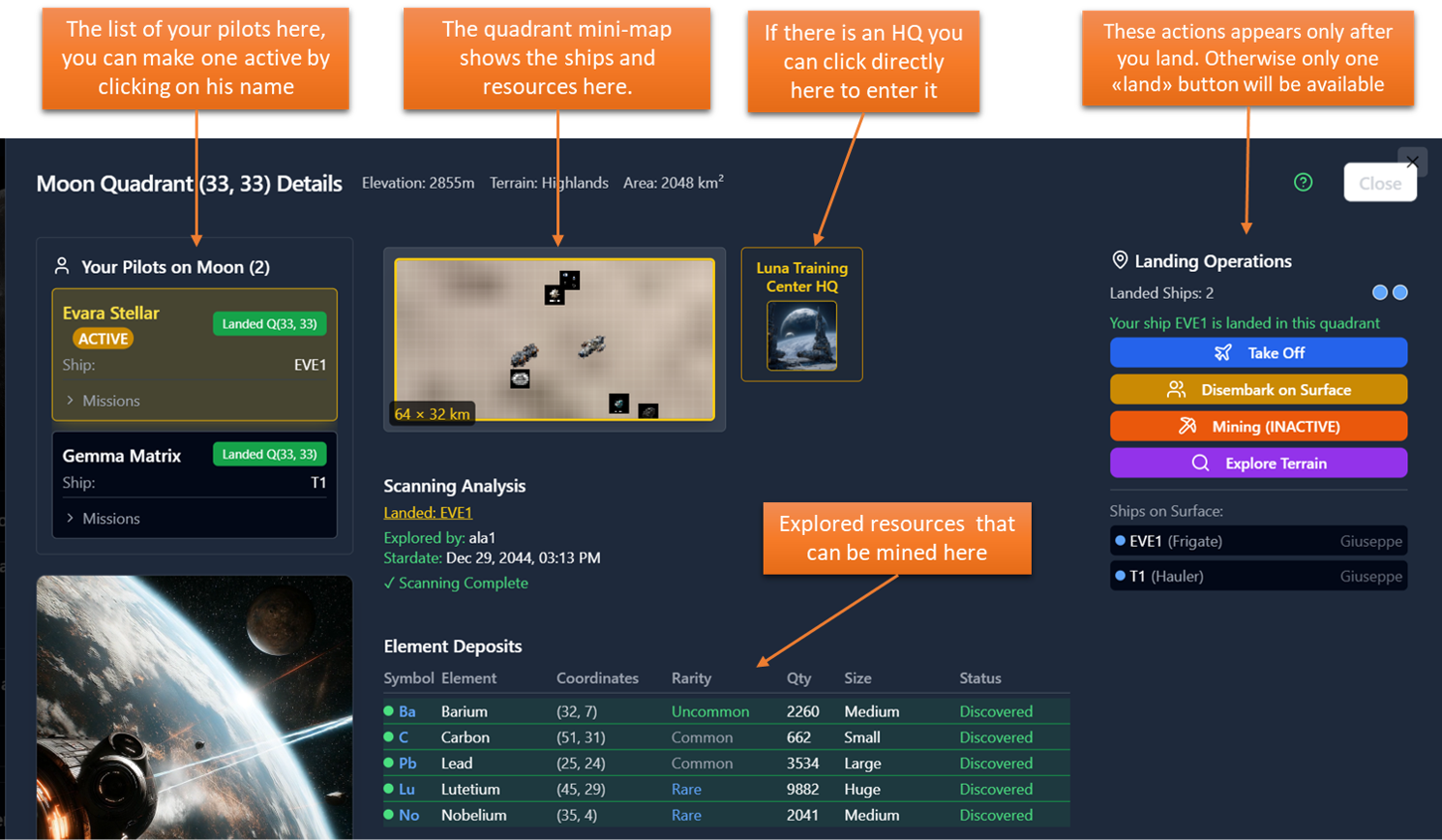
Let's see the overview of the Quadrant Details page. For this example we chose quadrant 33,33 on moon, that is fully scanned and where there is the Moon Headquarter.
There are several information here take some time to study them.
Notice that the "Land" greed button appears only if you open a fully scanned quandrant.
In the future will be possible for the users to purchase explored quadrants and build installations on them. For now it is stored the name and date of the first explored to scan 100% of the quadrant.
If an HQ is in a quadrant you can direclty click on the HQ icon in the minimap to open it immediatly.
The resouce list have full information here, but this is not usual: to have all the resources information (type, positions, quantities etc...) the quadrant shall be fully scanned and the rsources fully explored (see more details in the mining section).
SCANNING
Let's see in details how scanning works.
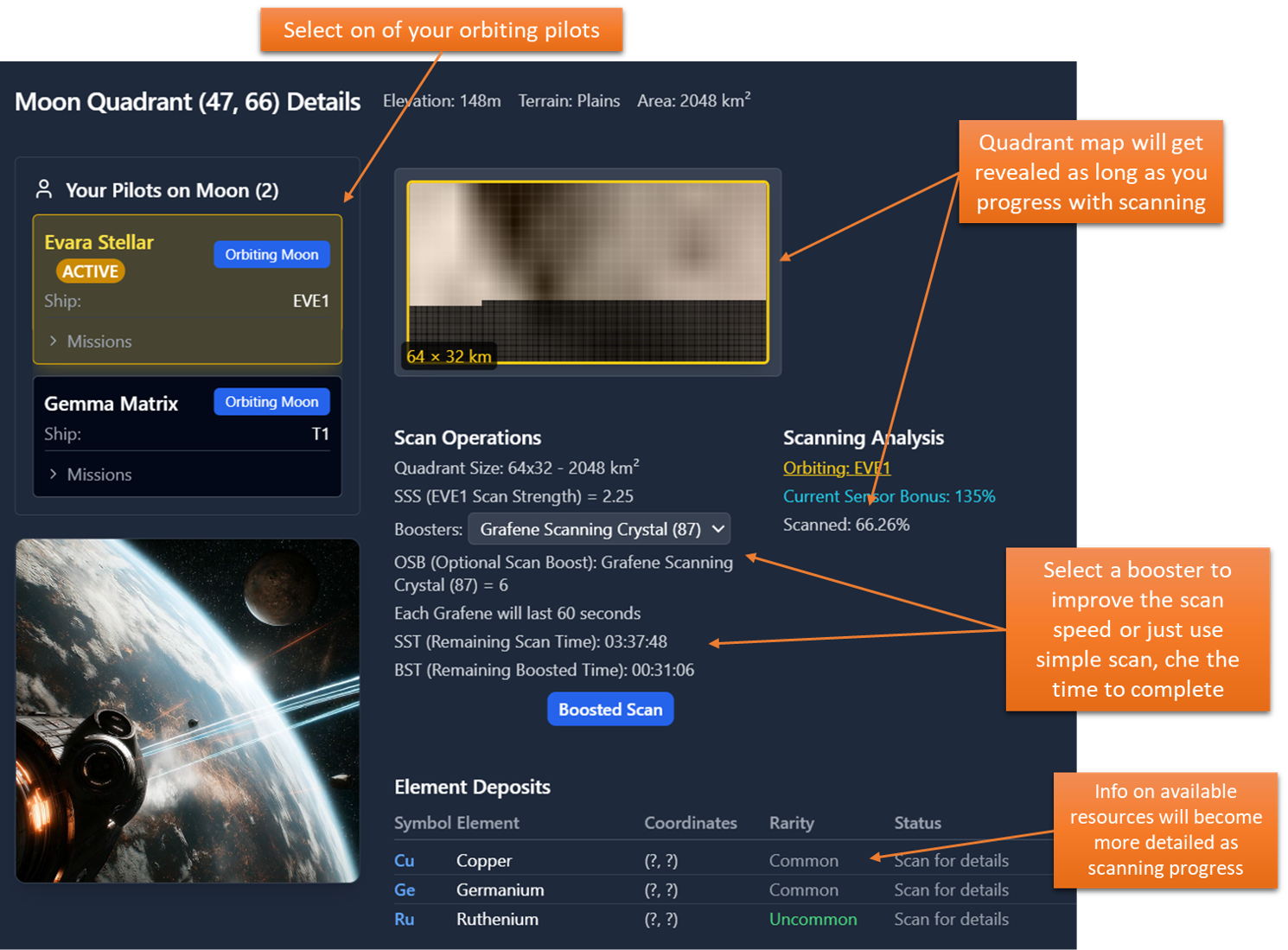
Scanning is the first activites to be done on any quadrant in order to be able to use it later on. Scanning is shared among all users, so once a quadrant is scanned all users can see the results. At the beginning, as you can see in the example here on the right, a quandrant is 66.26% scanned and it is not possible to land on it.
If you have a ship in orbit you always have the option to start a "Simple Scan" and you can see how much it will take: in the example here you will take 3 hours 37 minutes and 48 seconds to scan this quadrant 100%.
The quadrant minmap is progressively revelead as long as scan progress.
Simple or Boosted scan?
If you use a scan "Booster" the time will reduce a lot. Try to bring in your ships' cargo some Graphene scanning crystals. They have power of 6 that will increase your base sensor strenght by 6+1 times. Look in this example the total time will be reduced from more than 3,5 hours to approx 30 minutes. Consider that each crystal will last only 60 seconds: this means that you will consume 32 crystals to complete the scan of this quadrant with that ship. If you finish the crystal before scan complteion basic scan will continue at lower speed.
Prospecting resources
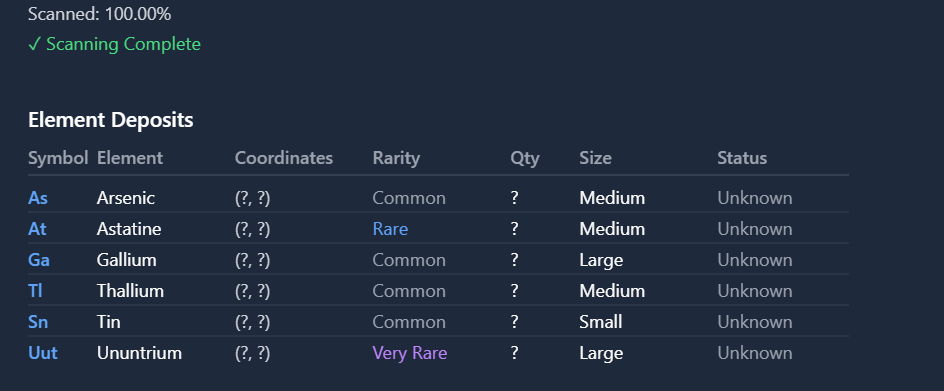
When a Quadrant is fully scanned, you can land on it and you will get information on the available resources like this example:
In this quadrant there are 6 good deposits available, 4 commons, 1 rare and 1 very rare. The exact quantities and position are not known yet, you shall use "Probes" to prosect and find the exact deposits position and size.
- Step 1: buy Scanning probes
Go to any HQ and look for planetary probes, buy some in your ship, and bring your ship back to the resource location:
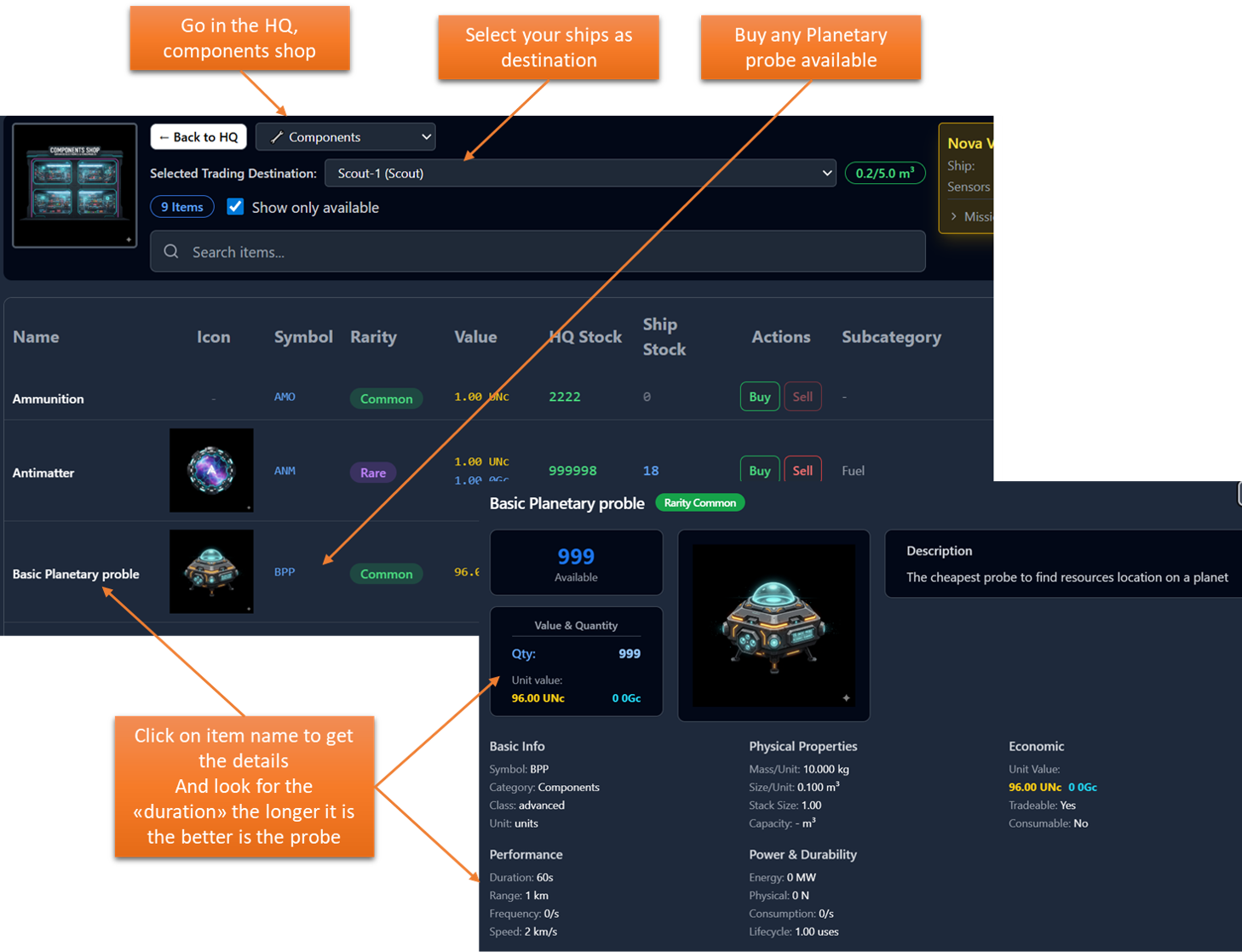
- Step 2: Land at a fully scanned Quadrant
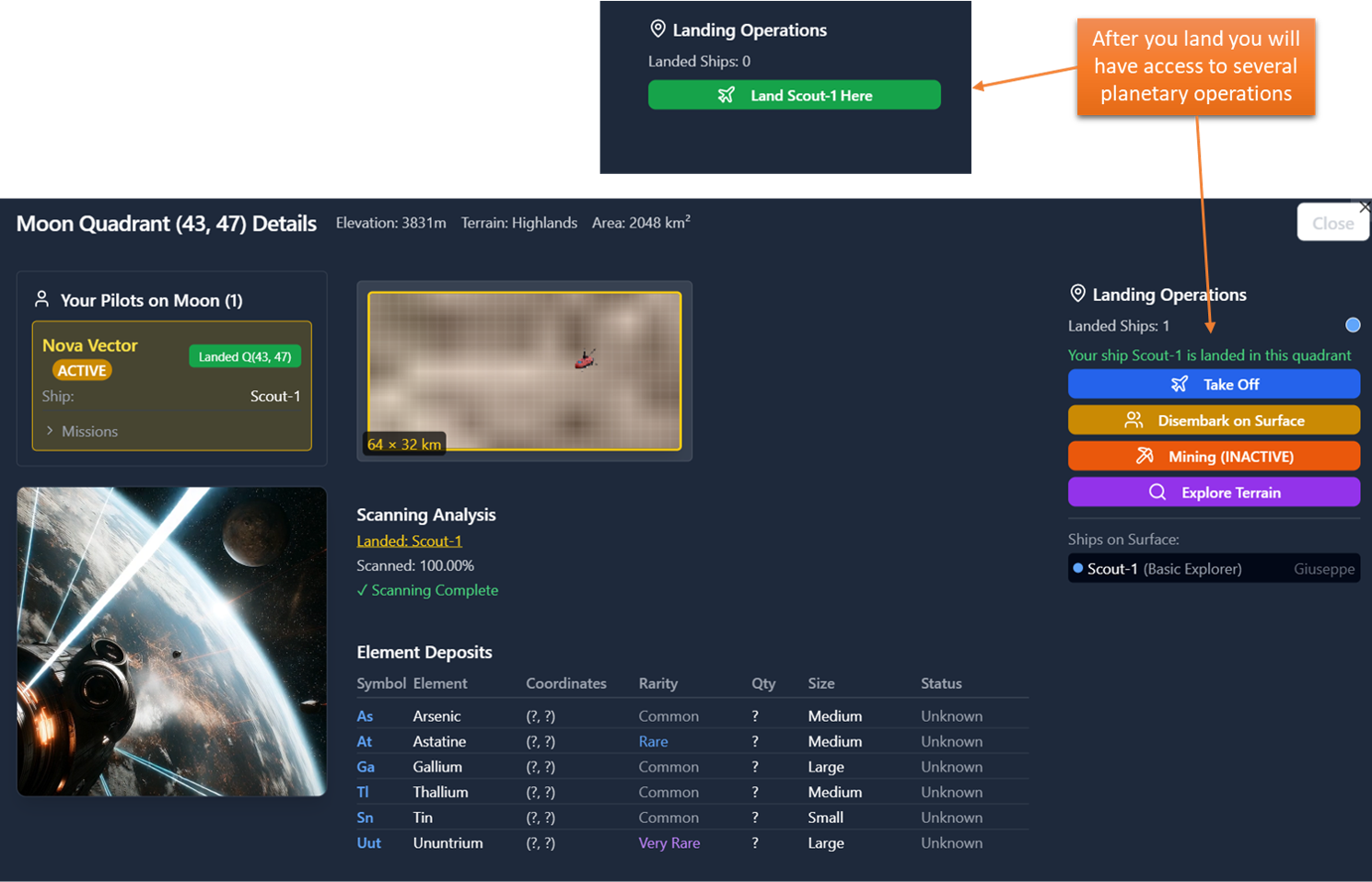
After you have probes in your ship cargo, go back to orbit, open planet again, select one fully scanned quadrant and the click land.
After landing you will have more option available like the ones show here.
To start Surveying for resources, click on Explore terrain.
- Step 3: Use the probes to find Resources
This is a kind of minigame: select a probe from the ones available in your ship cargo, drop it on a random location on the map: a green circle will appear showing you the distance from the probe of one undiscovered site. Click on the map the probe will move in the direction of the clicked positon. If you see the green circle enlarging then you are going in the wrong direction. If you are able to make the green circle collapse on your probe before the probe expires then you found a deposit!
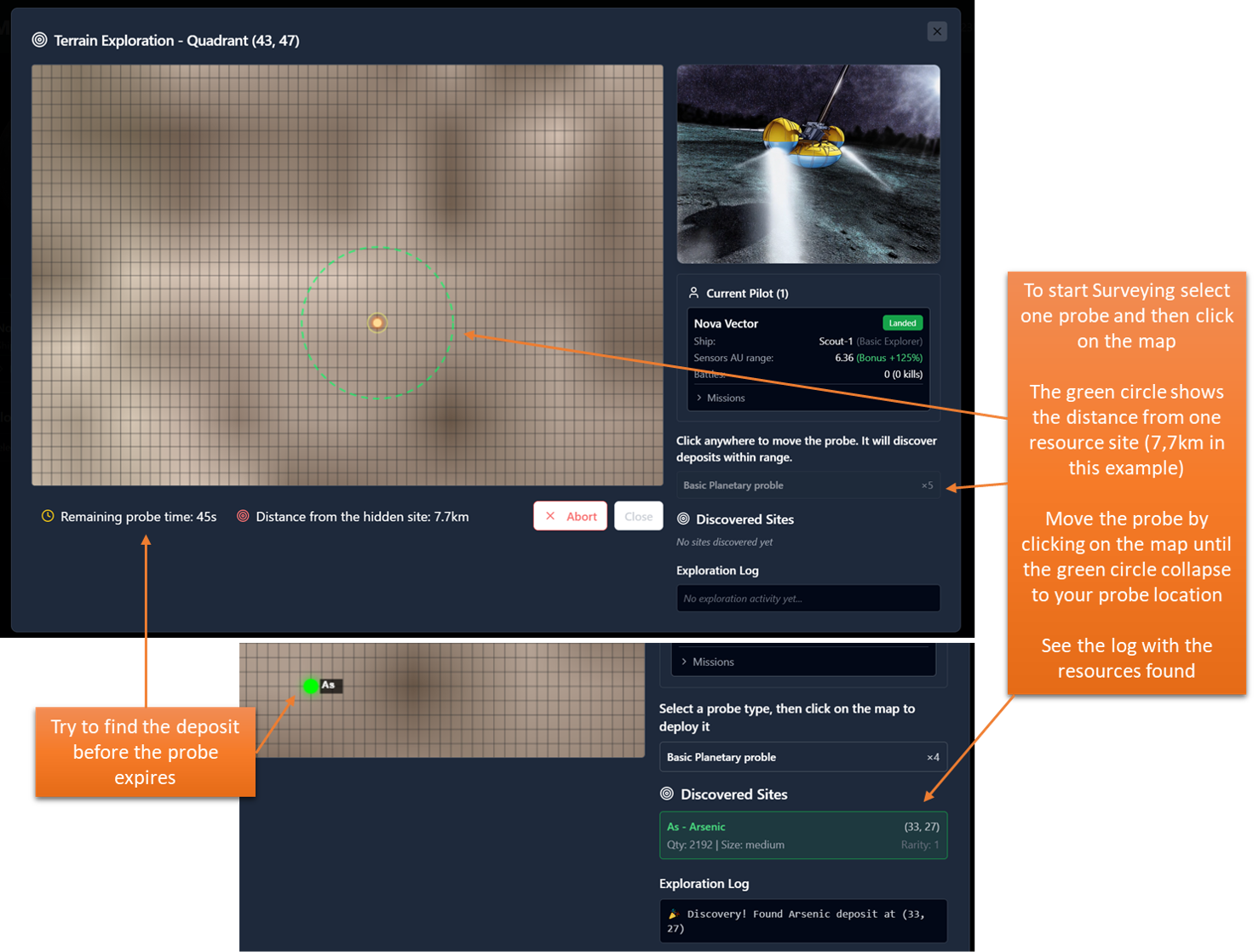
- Step 3: You can start mining now!
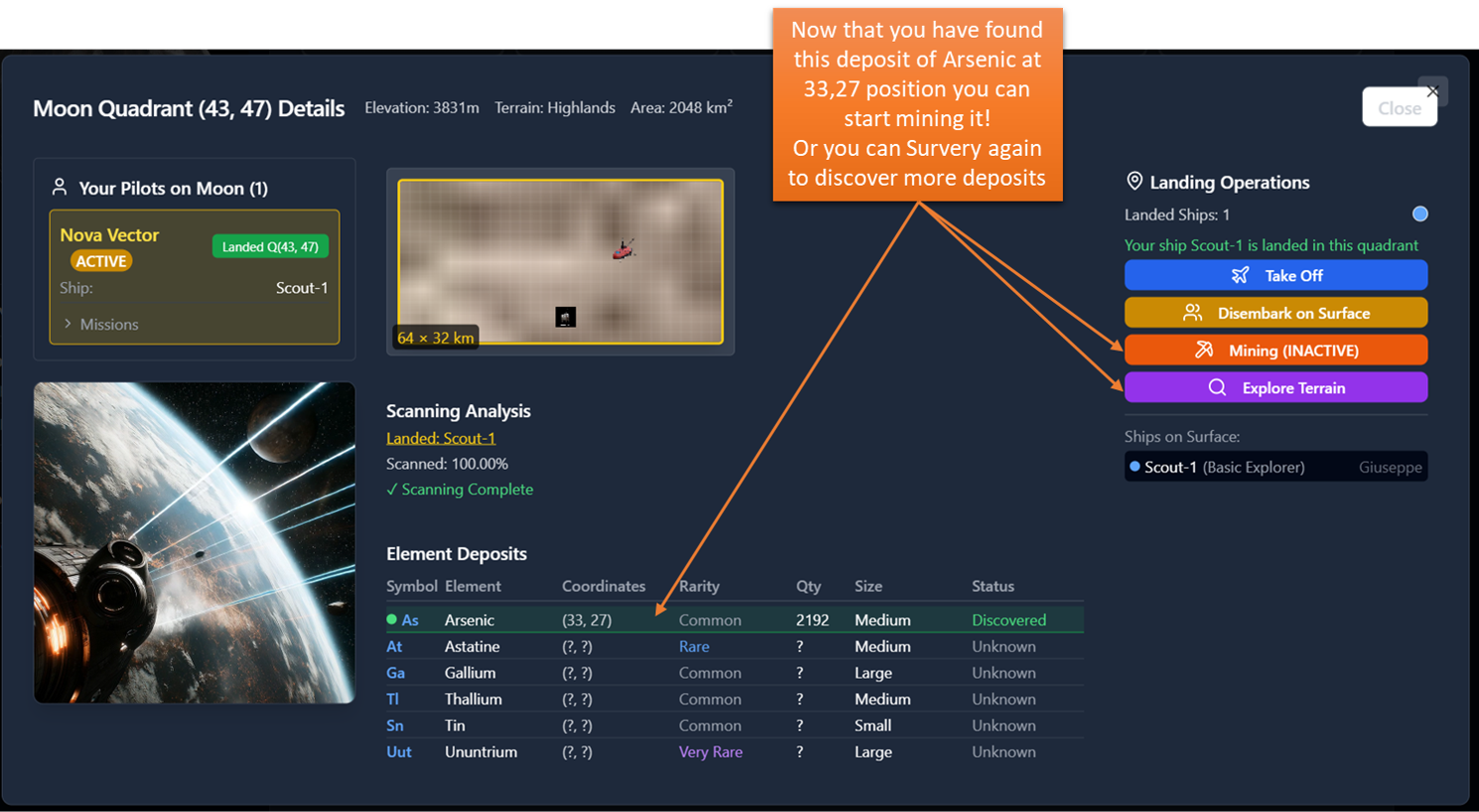
Go back to the quadrant page and you will see that Arsenic deposit is now "Explored" and you can see it's precise position and Quantity available. Note that these information will be available to all users so anyone can start mining that deposit.
If you want to mine that click on the "Mining Operation" button.
Mining Operations
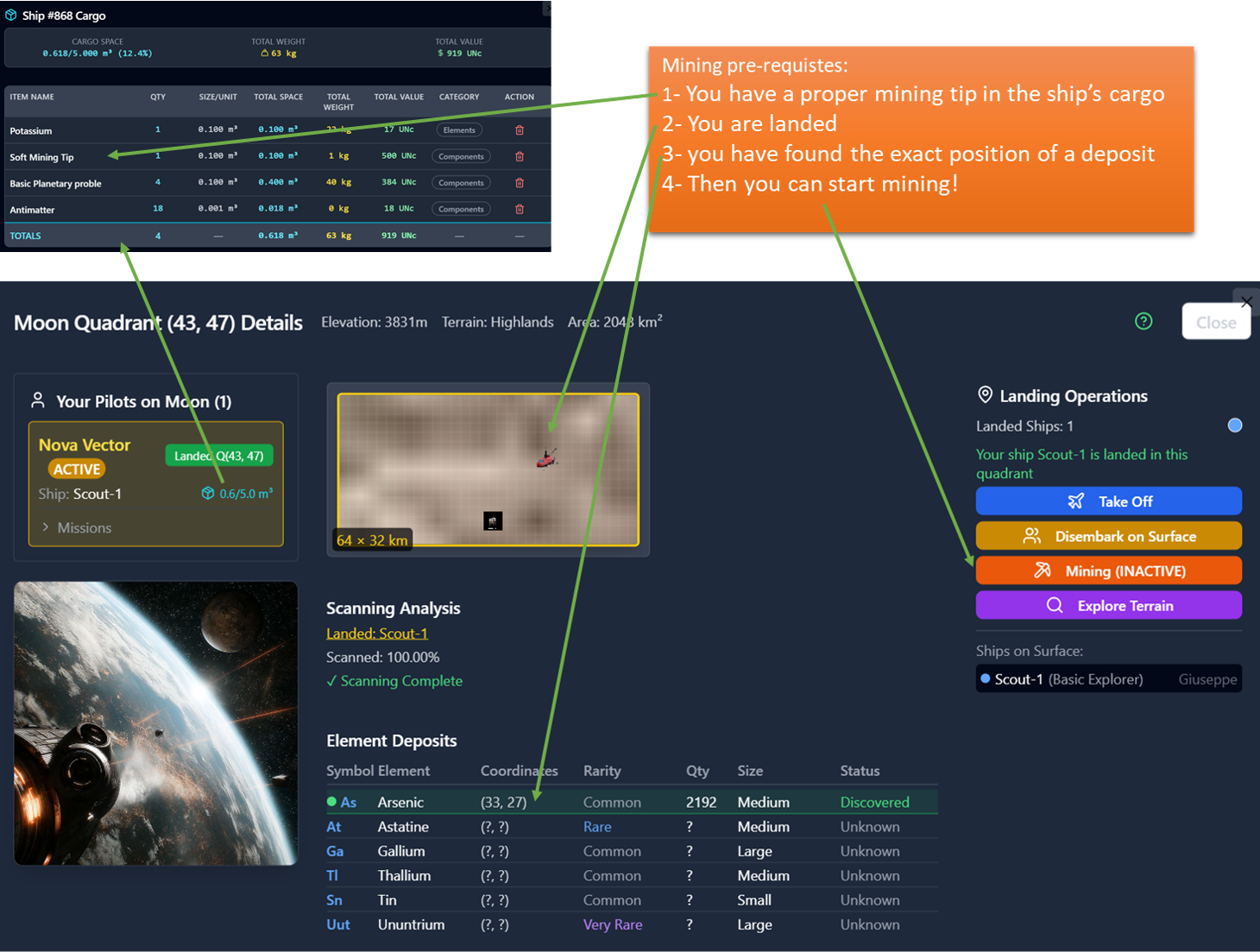
To start Mining it is essential that you are landed at the same quadrant of an "explored" deposit (see propsecting resources above).
In the landed ship's cargo you shall have available one ore more mining tip of the proper strenght for the deposit.
Then you can start mining by clicking on "Mining Operations" button.
- Mining Tips
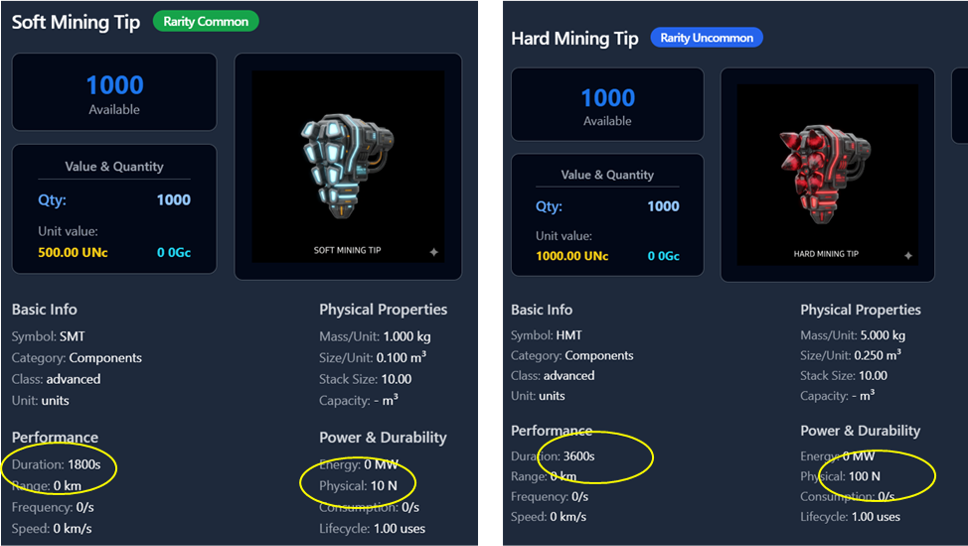
Mining tips are consumable objects that you can buy at any HQ and comes with different strenght: the higher is the strenght the more rare element you can mine. Look the two basics Tips in the picture on the right. Their main statistics are the one circled in Yellow.
Duration is how long, in real time, the tip can mine out resources before getting destroyed
Physical is the strenght in Newtons that the tip can sustain. The higher is the strenght the more rare resouces you can mine and your extraction will be faster. To begin i suggest you to buy a few Soft Tips, that are cheaper, and try to mine some common ores.
- Selecting Tips and resources to mine
Now you can click on the "Mining Operations" red button to enter this page. On the left you can select which will be the pilot and ship that will start the mining. After you select one pilot, you will get the list of the available Tips in the pilot's ships.
On the right you can select one of the explored resources deposits at this quadrant. After you select, e.g. Barium deposit that is of Uncommon rarity, you will notice that your tips cards will display if they are strong enough.
So, to start mining: make active one pilot with Tips aboard, select an ore deposit, select the proper Tip, look a the proposed results and changes until you are satisfied, then click on "Start Mining".
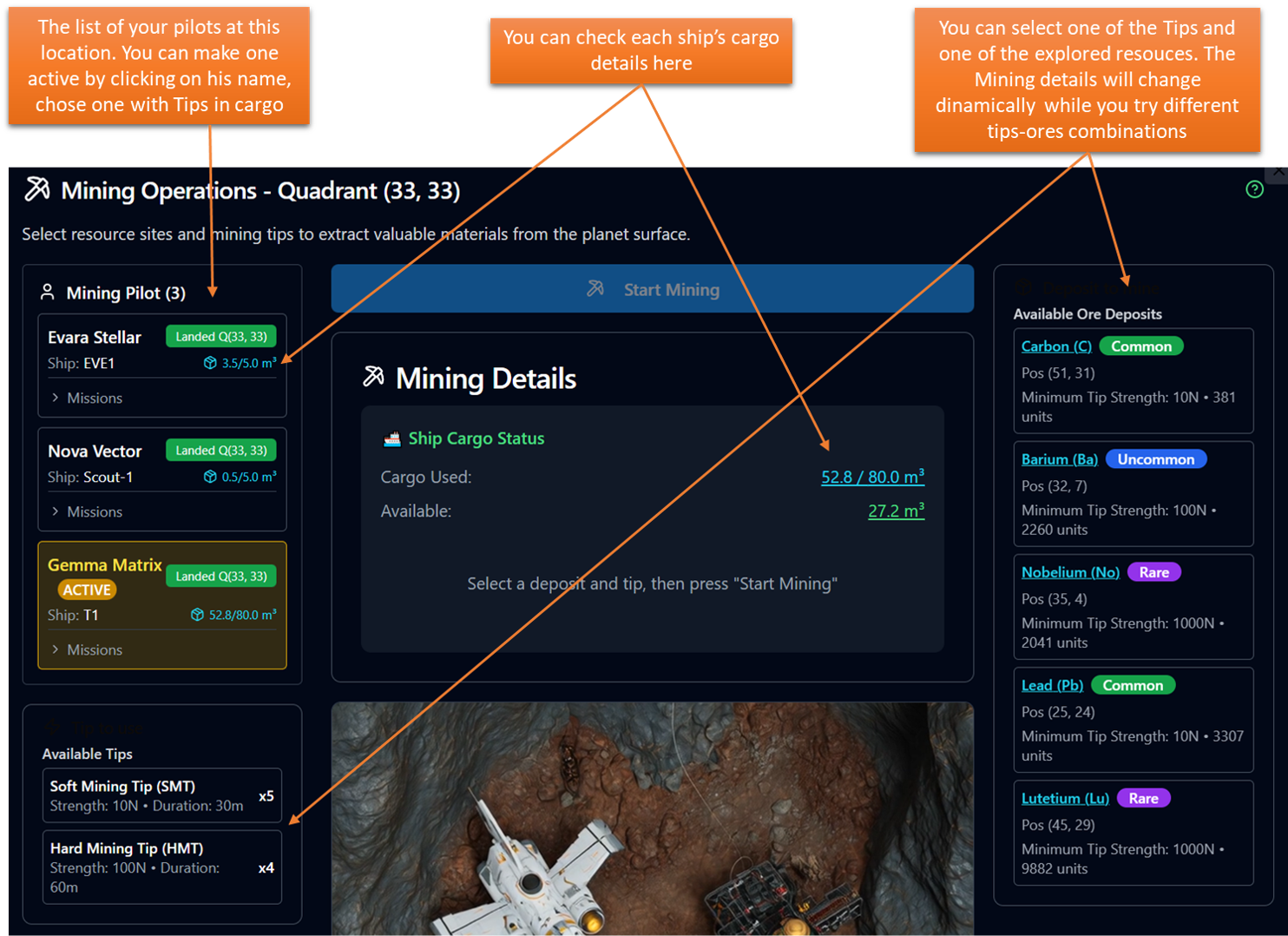
Let's see some examples:
- Example 1: Mining common Lead with a Soft Mining Tip
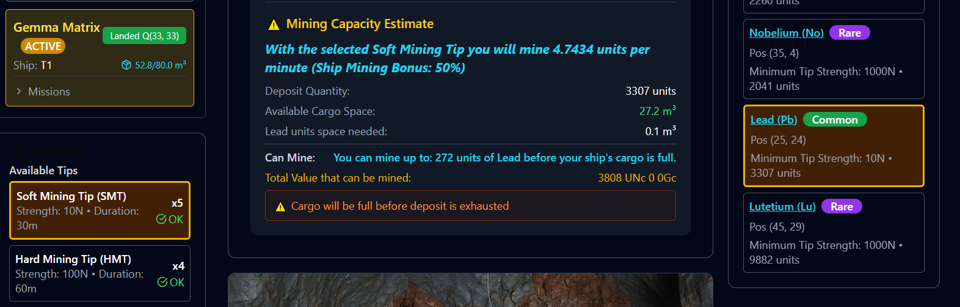
Look the example below: I can use both Soft or Hard mining tips here, and i selected the Deposit of Lead and Soft Tip. My ship's cargo has only 27.2 cubic meters of space so i can mine a total of 272 units only before cargo is getting full for a total value of 3808 UNc. Note also that the panel mention that my current ship has a 50% bonus to mining rate (this is an intrinsic ship capability that you can see in the ship details panel) and i will mine 4.74 units per minutes. Also remember that the Soft Tip will ast only 30 minutes so with one tip i will be able to mine only 4.74x30, approx 140 units.
- Example 2: Mining Uncommon Barium with an Hard Mining Tip
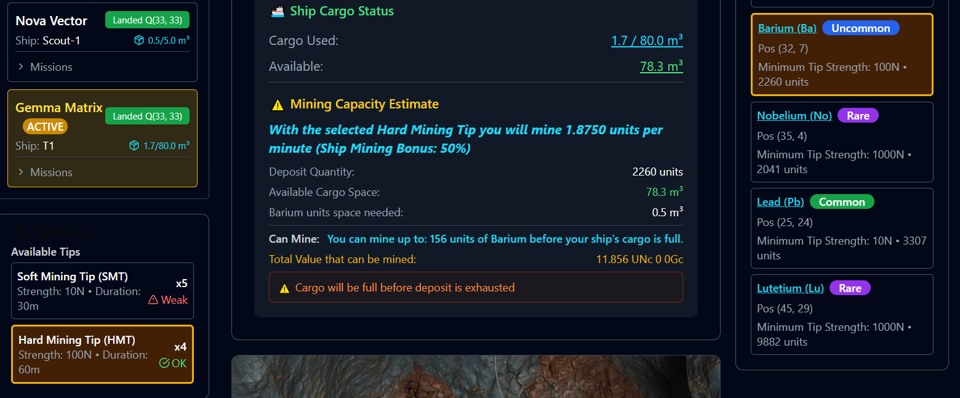
In the example below i selected Barium so I can use only Hard mining tips and you can see that the Soft Tip is "Weak". Now I have much more cargo free, 78.3 cubic meters and each unit of Barium will use 0.5, so i can mine 156 units before my ship gets full. At the current prices this will value 11856 UNc.
Notice the speed too: 1.875 units/minute, so for 156 units this would take 83 minutes that is more than the Tip Duration (60 minutes) so i will need two tips to fill the cargo..
- START MINING!
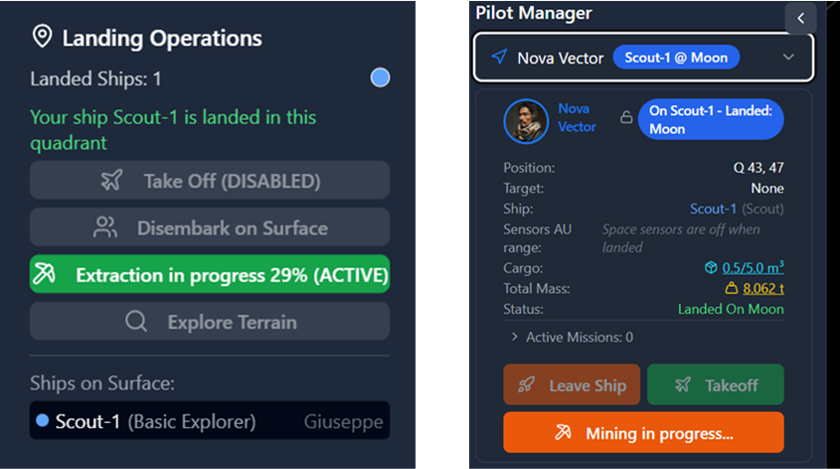
Finally did you clikc on start mining? Here it is what happens:
your pilot and ships cannot do other things while mining, see how the pilots option are restricted now.
The pilot & ship will be in "Mining" Status until you stop the mining. Mining will progress, like scanning, even if you close the browser or disconnect. To finish the mining you shall go back into this page and click the "Complete Mining" red button.
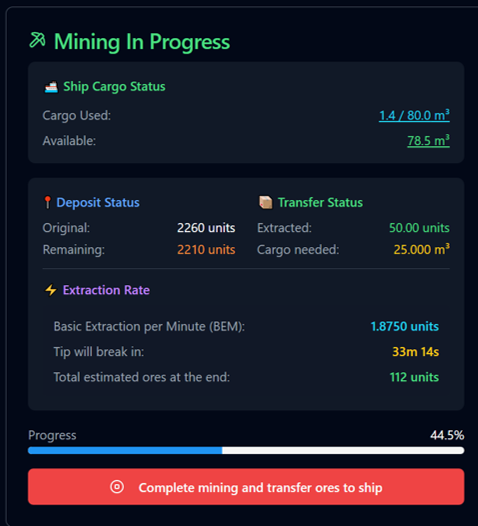
In the mining page you will get this new progress report, updated in real time, that shows you how it is proceeding. You can complete the operation at any time or just wait, do other things with other pilots, and come back when the operation is finished. The mining auto-stops when: the tips expires or the deposit is empty or the cargo is full.
Notice that the actual ore transfer take place only when you click the Red button and that will also remove the "Mining" status from your pilot and ship.
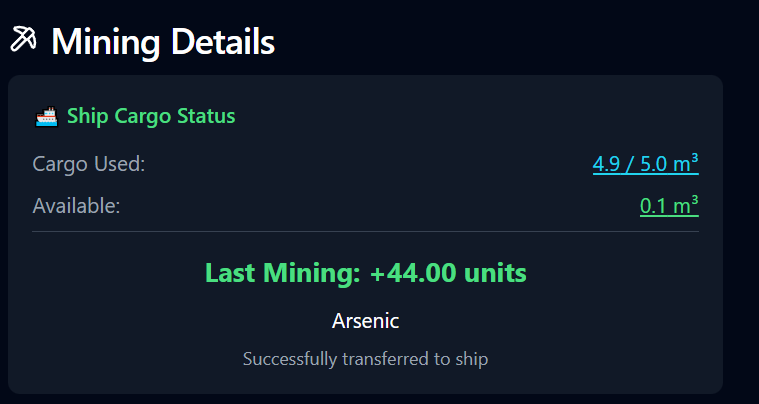
Notice that no ore is transferred to your ship's cargo Until you click on the Complete button.
Once you do, you will get a final confirmation message and your ship's cargo will be full of ores that you can sell or use to craft new items (to be implemented).