What cruising is
Cruising is how you fly your ship over a planet's surface and put it down where you want it.
You need it to land anywhere that is not a major spaceport, and you need it to reach ore, because mining now requires your ship to be physically close to the deposit.
It is real time and fully multiplayer. Other pilots are flying the same terrain at the same moment, and you can see them.
Before you fly: three stats on your ship card
Your ship's own numbers decide how it handles. Open the ship card and find these three.
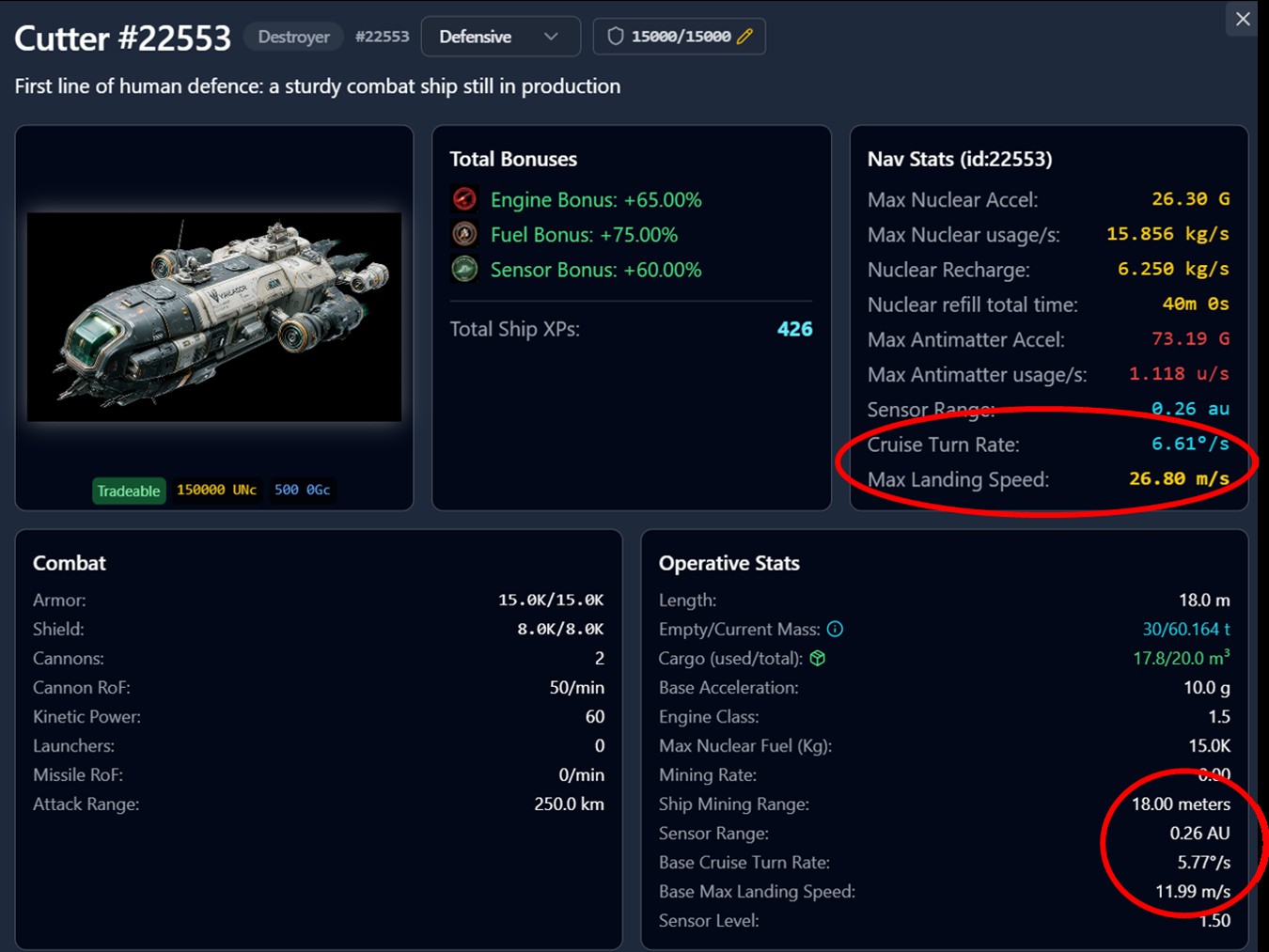
Cruise turn rate
How quickly your ship rotates with A and D. Driven mostly by your maximum G and your mass. A scout turns. A loaded hauler argues.
Maximum Landing Speed (MLS)
The impact speed your landing gear and shields can absorb without damage.
This is measured on your TOTAL speed: horizontal plus vertical combined. Under it, the landing is clean and you take no damage at all. Over it, shields take the hit irst, then armour.
Ship Mining Range
Listed under Operative stats. The furthest you can be from a deposit and still mine it.
Starting a cruise session
Go to the quadrant page of a fully scanned quadrant. You will see three buttons.
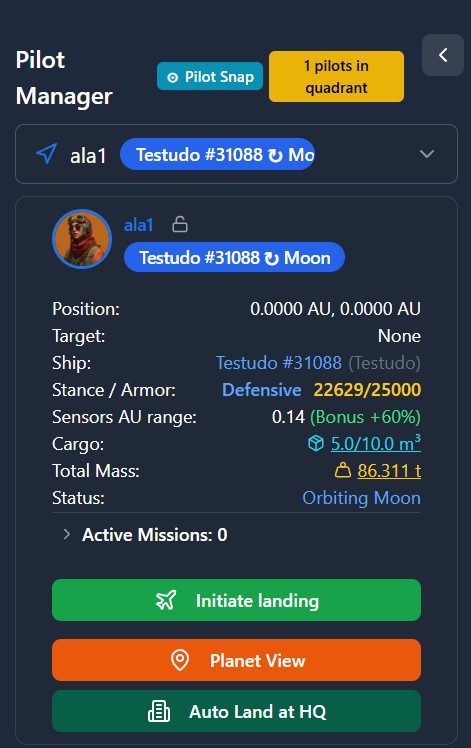
Auto Land at HQ
One press and your ship is placed at the spaceport. No flying required. This behaves exactly as landing did before 5.5.0.
It only appears at the larger HQs that have a spaceport, which currently means Earth and the Moon.
Planet View
Look at the surface without flying.
Initiate Landing
Land anywhere else in the quadrant. This is the button that opens a cruise session.
After pressing it, double-click anywhere on the map to set your destination.
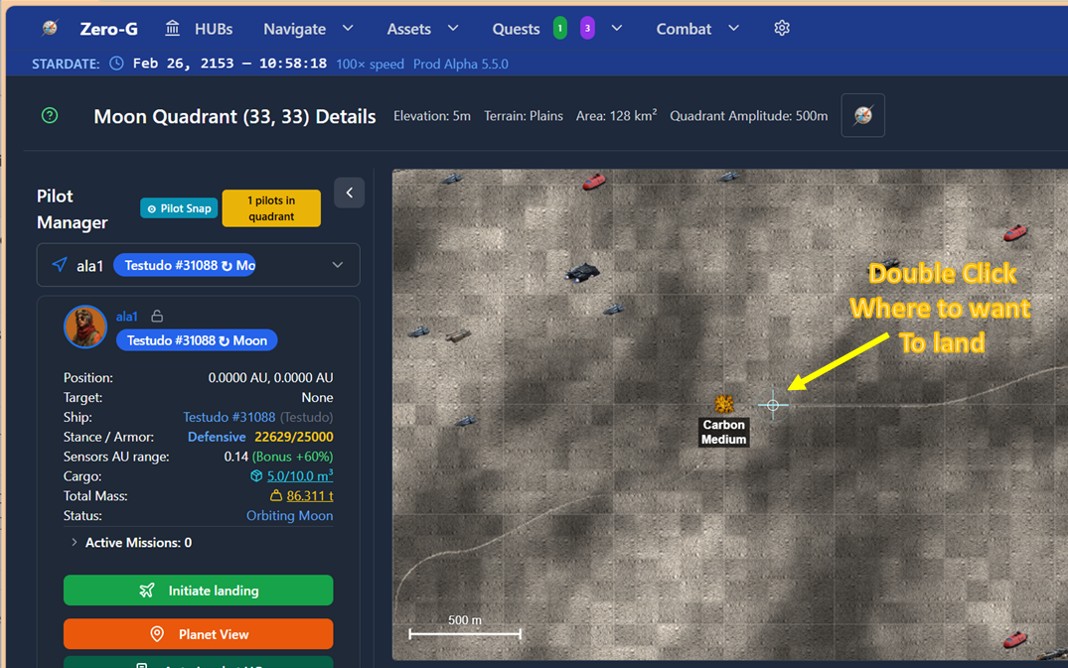
The session then opens with your ship already descending vertically from a random position, its route drawn on the left view.
Press Q immediately. That stops the descent and holds you at altitude while you get your bearings. Nothing bad happens if you take a moment.
The two views
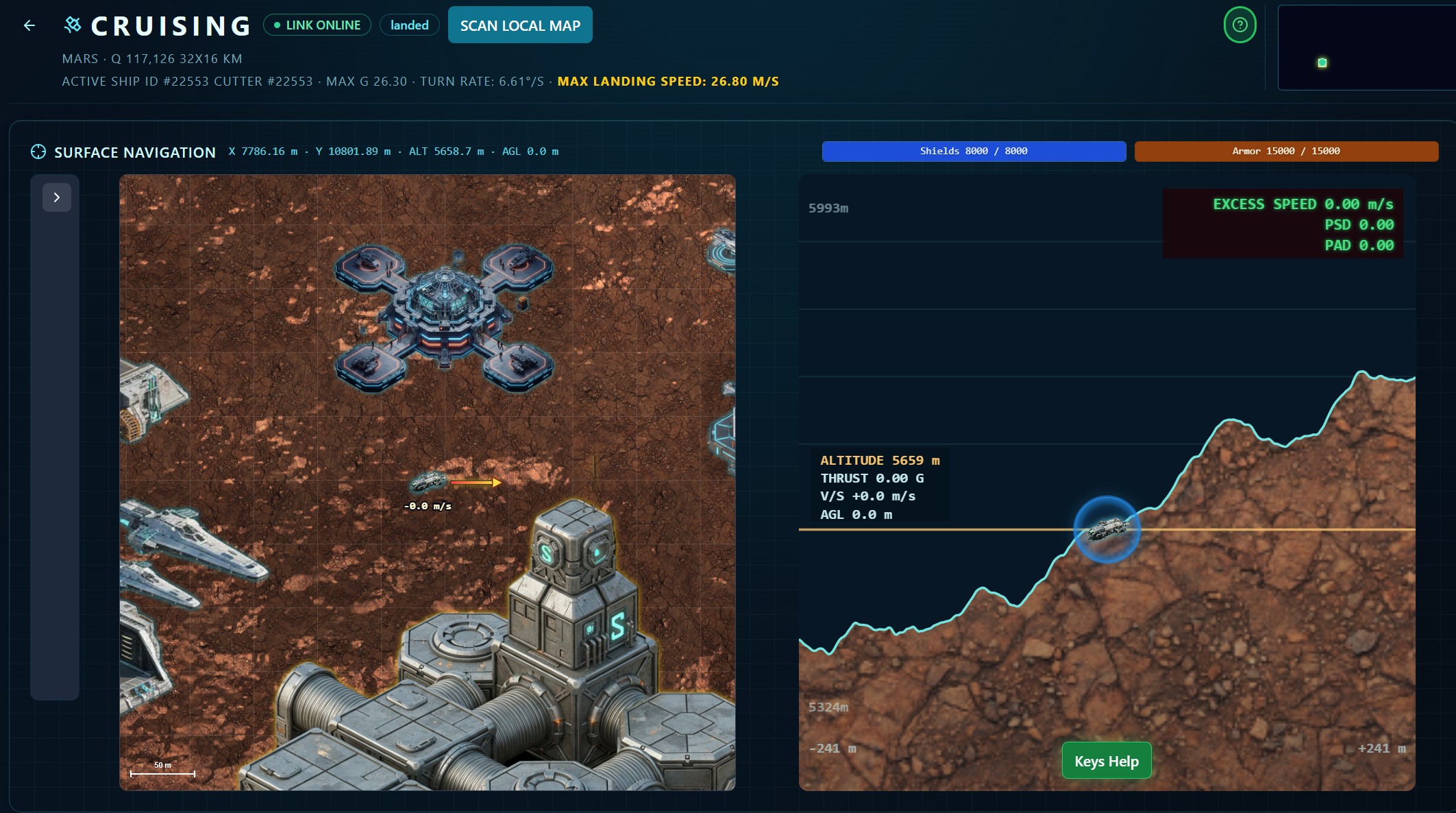
Left: top-down
Your ship and the terrain around it, seen from above.
- Scan Local Map sharpens the terrain detail, exactly as it does on the quadrant map
- The view zooms. Watch the scale indicator
- Zoom in far enough and everything is drawn at true size: your ship, buildings, other players' ships, deposits. This is how you judge whether you are close enough to mine
- The red and yellow arrow shows the direction forward thrust will take you
Right: elevation profile
A cross-section of the terrain ahead of and behind your route. This is the view that tells you whether you are about to fly into a ridge.
- The horizontal scale follows the left view
- The vertical scale is yours to control. Mouse wheel to zoom it, click and drag to pan
- Exaggerate the vertical when you need to read a shallow slope properly
The controls
The Keys Help button lists these in-game.
- SPACE, held: vertical thrust, climb. AGL shows your height above ground, live
- Q: kill vertical speed and hold altitude. This is a toggle
- W A S D: move and rotate horizontally
- E, held: progressive brake until horizontal motion stops completely
- V: hold your current vertical speed
Your ship's responsiveness comes from its own stats. Go gently the first few times. It is entirely possible to destroy a ship by flying it too fast into the ground.
Q and V are not the same thing
This is the most important distinction in the whole system.
- Q zeroes your vertical speed and parks you at a fixed altitude, applying thrust equal to the planet's gravity. You hover.
- V freezes your vertical speed at whatever it currently is. Planet-matching thrust with no braking. A descent at 8 m/s stays a descent at 8 m/s instead of accelerating.
Q stops you. V stops the acceleration.
Q is a toggle. Press it twice and you are in free fall. Press it again to stabilise. Every pilot does this once.
How to land
- Fly to a position above your landing point
- Hold E until horizontal motion stops, then press Q to hold altitude. You are now hovering, stationary
- Press Q again to release the hover and begin a free fall
- Watch your vertical speed climb toward your MLS, shown in yellow at the top of the screen
- As it approaches MLS, press V. Your descent rate now holds steady instead of building
- Touch down
Kill the horizontal motion first. MLS is measured on total speed, so a gentle descent while still drifting sideways can still wreck the ship.
Reading the damage before you take it
Top right of the elevation view, two readouts update continuously.
- PSD: Potential Shield Damage
- PAD: Potential Armour Damage
They show the damage you would take if you hit the ground right now, at your current speed.
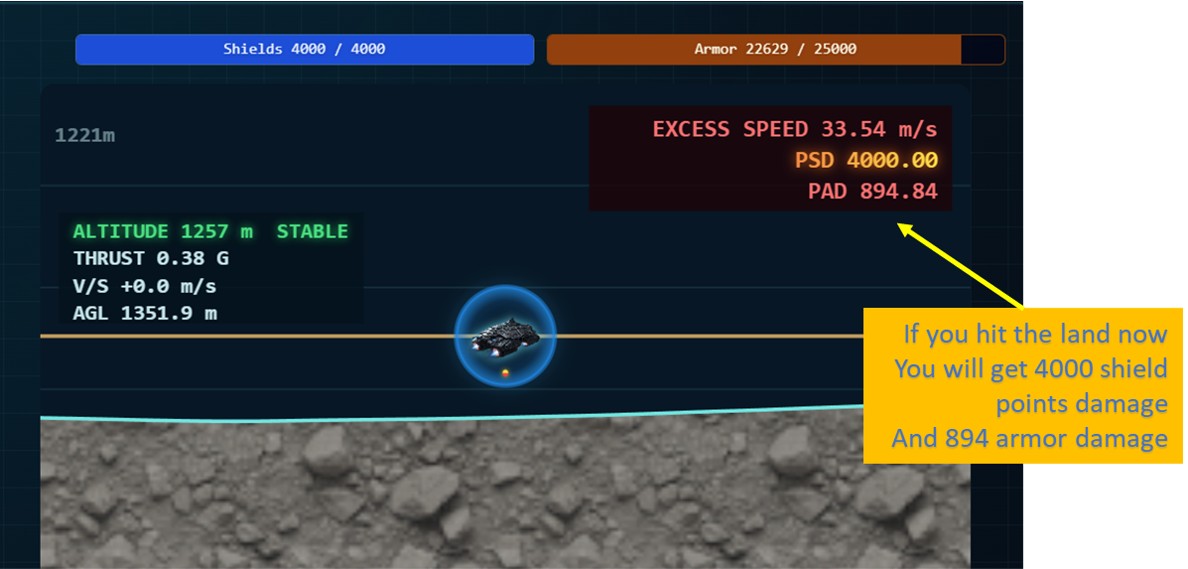
- Green: clean landing, no damage
- Red: you will take damage
- Yellow: maximum damage, and the ship may be destroyed
Shields absorb first. Armour takes whatever is left.
You never have to estimate this. The numbers are on screen the entire way down.
Cruising and mining
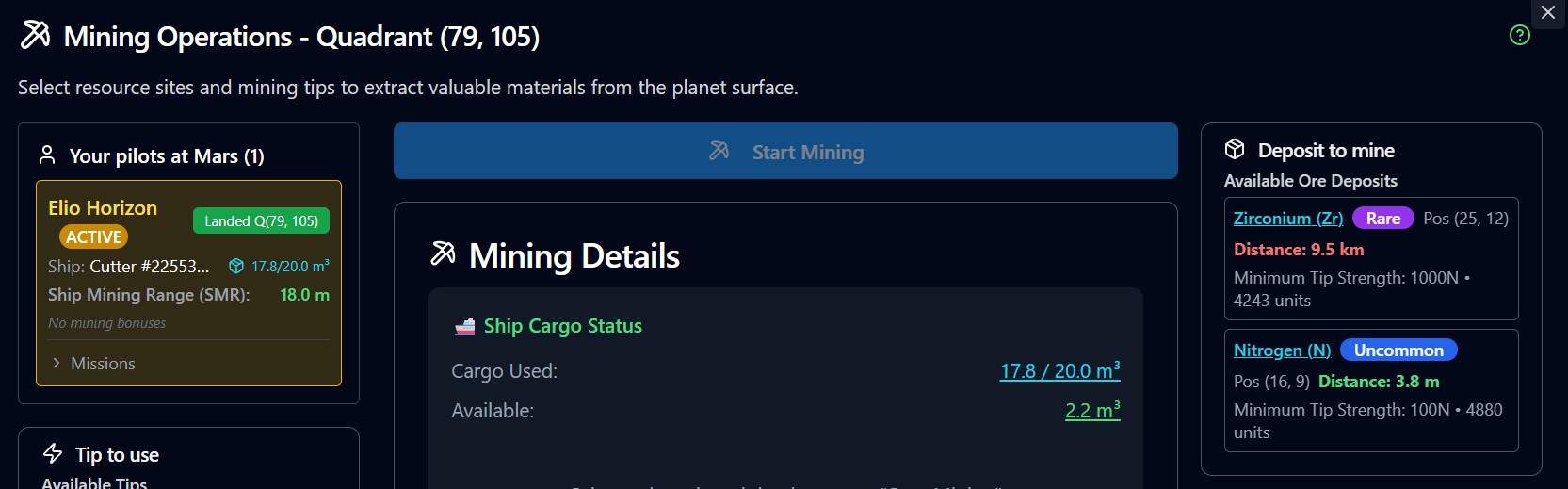
The mining modal now shows the distance from your active ship for every deposit, and mining only starts when you are inside your ship's Mining Range.
The workflow is: scan the quadrant, find the deposit, press Initiate Landing, cruise to within range, land, mine.
Common mistakes
- Pressing Q twice by accident. It is a toggle. If your ship starts falling unexpectedly, press Q once more
- Landing sideways. You watched the vertical speed and forgot the horizontal. Hold E first
- Flying a hauler like a scout. Turn rate and braking both come from mass. Learn on something light
- Coming down far from the deposit. Check your Mining Range before you commit to a landing point. The top-down view at true scale exists for exactly this
- Not using the elevation view. The terrain ahead is genuinely not flat. Zoom the vertical scale and look before you thrust forward
You are not alone down there
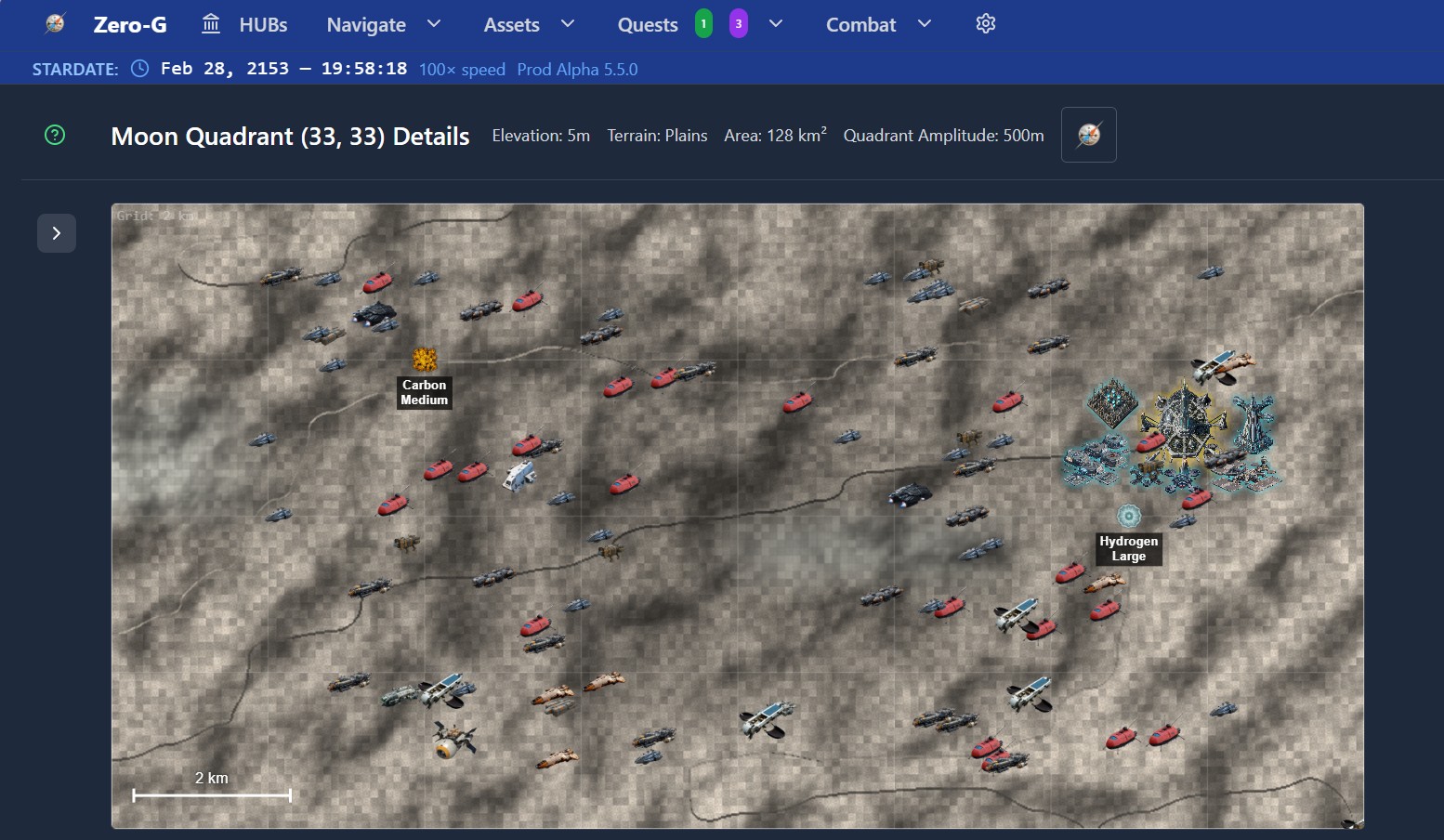
The quadrant map shows every ship from every player, landed or in cruise. Other pilots' ships appear in your top-down view at true size when you zoom in.
Nobody can attack you while you fly or mine.
Quick reference
- SPACE, held: climb
- Q: hover on and off. Toggle
- W A S D: move and rotate
- E, held: brake to a stop
- V: hold current descent rate
- AGL: height above ground
- MLS: maximum landing speed, total, horizontal plus vertical
- PSD and PAD: the damage you would take if you hit the ground now